Capabilities
One product, two jobs done right
One per-seat license covers both halves of the solution: automatic, tamper-proof enforcement that
satisfies your session-termination control, and seamless session recovery that keeps your people
productive. Deployed centrally, managed by policy, and built to pass an audit.
⏱️
Automatic session termination
Signs users out once they hit a maximum session length you set — the real
AC-12 / 3.1.11 session-termination control, not just an idle screen lock. Every active
session's age is tracked accurately, even across disconnects and reconnects.
Enforcement
🔔
Fair warning before sign-out
Users get a heads-up on a schedule you choose (e.g. 30, 15, 5, 1 minutes out). You control
the popup title and message — with a live countdown — and can preview the exact wording with one click
before it ever reaches a desktop.
Enforcement
🧪
Risk-free rollout
Ships in a log-only mode that records exactly who would be signed out — straight to the
Windows Event Log — without ending anyone's session. Switch to enforcement once you've confirmed the
policy behaves on your fleet.
Enforcement
🛡️
Tamper-resistant by design
Runs as a protected system service that standard users can't stop, disable, or reconfigure. Settings are
password-protected, and Group Policy always wins — so the policy you set centrally is the policy
that sticks.
Enforcement
🗂️
Desktop, restored — hands-free
Curfew snapshots every open window right before sign-out, then can rebuild the workspace on its own
seconds after next login — same apps, positions, size, and state. Prefer control? People can still pick
any recovery point by hand.
Recovery
📄
Documents reopened, not just windows
Goes beyond window positions: reopens the actual Office documents and files people had open, brings
back browser tabs, and reconnects .rdp Remote Desktop sessions — nothing to dig back up
by hand.
Recovery
🔒
Private & CUI-safe
Everything stays on the endpoint — encrypted at rest and keyed to the Windows user, with no
cloud, network calls, or telemetry. Capturing file paths is optional, and history auto-expires on a
retention schedule you set — useful wherever CUI is in scope.
Security
📦
Deploys through your tools
A per-machine service plus a lightweight per-user app, managed entirely by Group Policy or registry —
no extra runtimes to package. Hidden from end users' Add/Remove list, with removal locked behind an
admin code.
Deployment
🧩
Enforcer optional
Already have an auto-logoff routine? The installer lets you deploy in snapshot-only mode — the
tray app and full session recovery without Curfew's session-limit service. The tray then shows a running
session-age counter in place of the countdown.
Deployment
App preview
What your people will see
A native Windows experience that stays out of the way — no browser, no login, nothing new to learn.
Everything lives in the system tray: a live countdown to sign-out, one-click snapshots, and full session
recovery. When a snapshot is restored, every app, document, and remote-desktop session comes back exactly
where it was — so a forced sign-out costs no lost work and no help-desk ticket.
System-tray menu (left- or right-click)
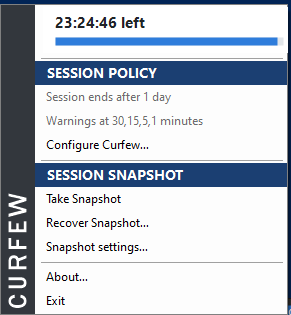
A live countdown shows the time left before sign-out. The Session Policy section (admin
password-protected) holds the limit and warning schedule; the Session Snapshot section is where
people take and recover their work.
Restore session window
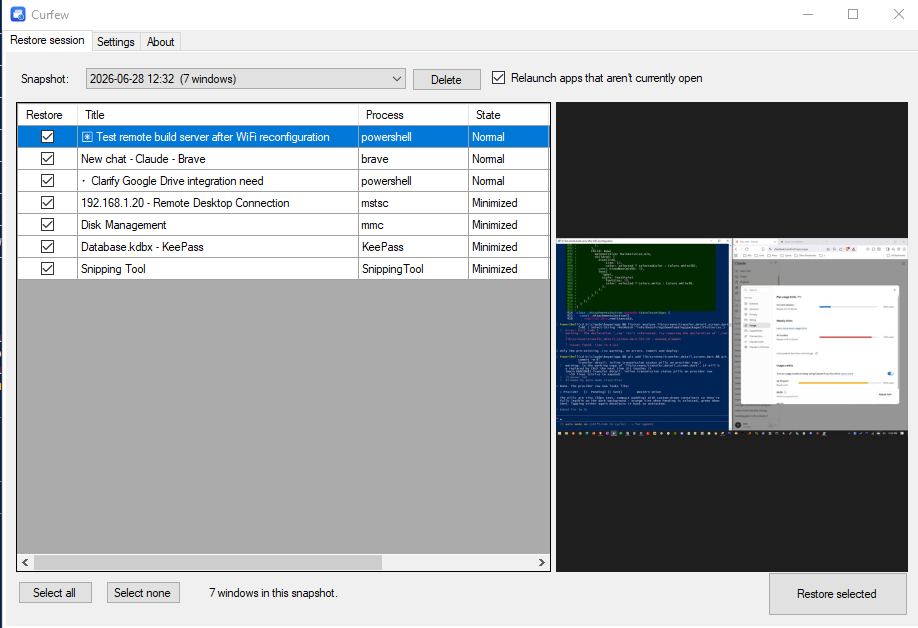
Pick a recovery point, review exactly what was open — apps, documents, RDP sessions — glance at the
screenshot preview to confirm it's the right one, then bring the whole desktop back in a single click.
Actual screenshots of the Windows app — sample recovery point, window list, and countdown shown for
reference.
 ▶ Watch the 3-minute overview